robotic module
The robotic module provides a client for robotic operation of the APO SONG telescope. It uses the routine and Alpyca devices of the aposong module to execute observatory, telescope and camera control.
The robotic module can draw targets and observing sequences from a local database or from a database populated by the SONG conductor at Aarhus.
The basic robotic operation is independent of where requests are drawn from. The main function is observe(). This will wait until a specified time relative to sunset to open the dome, and then wait until a specified time relative to nautical twilight to start observing. Observing continues in a loop until a specified time relative to morning twilight. Safety status is checked in between each object to determine whether to suspend operations until it becomes safe again; note that the dome closes independently immediately on unsafe conditions through the Dome server.
Local requests are drawn from a Postgres robotic schema that includes a database table (requests) that gives a target (defined in target table), observing schedule constraints (defined in schedule table), and observing sequence (defined in sequence table). The getbest() routine selects the best object to observed given the constraints and length of observing sequence based on either a criterion to observe objects before they set (default), or to observe objects that will be available for the longest amount of time.
For SONG targets, robotic targets are conducted through Postgres database syncs from Aarhus to the song1m_db machine. Requested observations are loaded into the obs_request_4 table in db_song with information about the target and the observing sequence. As the request is started, completed, or aborted, the status is communicated back through the obs_reqeust_status_4 table in db_apo. Other tables in db_apo communicate the state of the APO system so that the conductor can choose appropriate targets.
Once an object is selected, it is acquired, guiding started, and then the exposure sequence executed. Completed sequences are logged back into the Postgres database in the observed table.
Calibration sequences can also be obtained automatically.
At the end of the night, web pages, focus curves, and guider movies for the night are constructed.
The contents of the database tables for local requests is shown below:
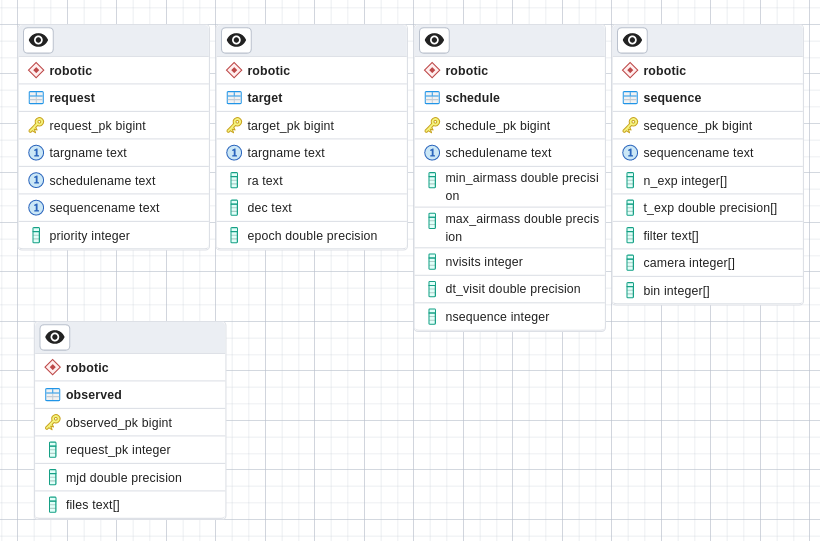
To add a local observation request, use the loadrequest() function. This requires specifying a target, sequence, schedule, from the respective database tables, as well as a integer priority (larger number is higher priority). You can retrieve existing entries in the tables using the query() function, and can add new entries using loadtarg(), loadsched(), and loadseq() functions. See docstrings (using help or ?) for details.
Module functions
- class robotic.Target(name, ra, dec, mag=99.999, epoch=2000.0)[source]
Defines a target and how to acquire it
- class robotic.Schedule(name, min_airmass=1.005, max_airmass=1.8, nvisits=1, dt_visit=1.0)[source]
Defines an observing schedule
- class robotic.Sequence(name, filt=['U', 'B', 'V', 'R', 'I'], n_exp=[1, 1, 1, 1, 1], t_exp=[1, 1, 1, 1, 1], camera=[0, 0, 0, 0, 0], bin=[1, 1, 1, 1, 1])[source]
Defines an exposure sequence, and a method of executing it
- robotic.hamax(dec, airmax, lat)[source]
Determine maximum hour angle given maximum airmass, declination, and latitude
- robotic.secz(ha, dec, lat)[source]
Determine airmass (secz) given hour angle, declination, and latitude
- robotic.getrequests()[source]
Get observing parameters for all requests by joining target, sequence, and schedule
- robotic.getsong(t=None, site='APO', verbose=True, max_airmass=2, dt_focus=10)[source]
Try to get observing request from SONG database
- robotic.getlocal(t=None, requests=None, site='APO', criterion='setting', mindec=-90, maxdec=90, skip=None, verbose=True)[source]
Get best request from local database table of requests and time
- robotic.observe_object(request, display=None, acquire=True, fact=1, nfact=1, header=None, req_no=-1)[source]
Given request, do the observation and record
- robotic.load_song_status(req_no, status, no_exp=None)[source]
Load status into song obs_request_4_status table
- robotic.observe(focstart=32400, dt_focus=[0.5, 1.0, 1.0, 2.0], display=None, dt_sunset=0, dt_nautical=-0.2, obs='apo', tz='US/Mountain', criterion='best', maxdec=None, cals=True, gtemp=-5, stemp=-20, initfoc=True, fact=1, nfact=1, usesong=True)[source]
Start full observing night sequence
- Parameters:
focstart (integer, default=32400) – initial focus guess
dt_focus (float, default=[1.5]) – minimum time to wait after focus run before triggering another (will wait for sequence to complete). if list, increment list index each time focus run is done, e.g. to achieve more frequent focus at beginning of night
display (pyvista TV object) – if specified, display images as they are taken
dt_sunset (float, default=0) – time relative to sunset to open dome (only if opening conditions are met)
dt_nautical (float, default=-0.2) – time relative to nautical twilight to start observations
obs (str, default='apo') – observatory name, for getting site coordinates
tz (str, default='US/Mountain') – time zone
criterion (str, default='best') – criterion for choosing object to observe, ‘setting’, ‘best’ or ‘longest’
maxdec (float, default=None) – if given, maximum declination
cals (bool, default=True) – if True take cals at end of night
gtemp (float, default=-5) – set temperature for guide CCD
stemp (float, default=-15) – set temperature for spectrograph CCD
initfoc (boot, default=True) – True to take initial focus run, so can set False if restarting after focus has been done
fact (float, default=1) – factor to increase all database exposure times by
nfact (int, default=1) – factor to increase all database number of exposures b
- robotic.focus(foc0=28800, delta=75, n=9, decs=[52], iodine=True, display=None)[source]
Do focus run for object on meridian
- robotic.loadtargs(file, schedule='rv', sequence='UBVRI', insert=False)[source]
Load database tables from old 1m input file
- robotic.loadtarg(targname, ra, dec, epoch=2000, mag=99)[source]
Load a single target into robotic.target
- Parameters:
targname (str) – Name of target, must be unique in table
ra (str) – RA (J2000) in hh:mm:ss
dec (str) – DEC (J2000) in hh:mm:ss
mag (float, optional, default=99) – magnitude of target, used to compute throughput in reduction
- robotic.loadsched(name, min_airmass=1.0, max_airmass=2, nvisits=1, dt_visit=0)[source]
Load a single schedule into robotic.schedule
- Parameters:
name (str) – name for schedule, must be unique in table
min_airmass (float, optional, default=1) – minimum airmass
max_airmass (float, optional, default=2) – maximum airmass
nvisits (int, optional, default=1) – number of requested visits, set to -1 to keep repeating
dt_visit (float, optional, default=0) – minimum amount of time between visits in days
- robotic.loadseq(name, t_exp=[1], n_exp=[1], filt=['V'], camera=[0], bin=[1])[source]
Load a single sequence into robotic.sequence
- Parameters:
name (str) – Unique name for observing sequence
t_exp (list) – Exposure times
n_exp (list of int) – Number of exposures, must have same number of entries as t_exp
filt (list of str) – Filters (‘open’ or ‘iodine’), must have same number of entries as t_exp
camera (list of int) – Camera to use (should be 3 for SONG spectrograph), must have same number of entries as t_exp
bin (list of int) – Binning to use (should be 2 for SONG spectrograph), must have same number of entries as t_exp
Example
loadseq(‘my_sequence’,t_exp=[200,500],n_exp=[1,5],filt=[‘open’,’iodine’],camera=[3,3],bin=[3,3])
would load a sequence called my_sequence that would consist of 1 200s exposure without iodine, then 5 500s exposures with iodine.
- robotic.loadrequest(targname, seqname, schedname, priority)[source]
Load a request in local robotic database
A request consists of a target (with pointing information), a sequence (with a specified sequence of exposures), a schedule (saying what is required to execute the sequence, and how many times to execute it), and a priority which sets the priority relative to other requests that might also meet their observability requirements. Targets, sequences, and schedules are loaded into their own database tables, and can be used by multiple requests. You can see the loaded values using robotic.query()
- Parameters:
targname (str) – Target name, must exist in robotic.target table
seqname (str) – Sequence name, must exist in robotic.sequence table
schedname (str) – Schedule name, must exist in robotic.schedule table
priority (int) – Priority, higher number is higher priority
- robotic.create_request(targname, ra, dec, epoch=2000, filter=['none'], bin=2, n_exp=[1], t_exp=[60], camera=3)[source]
Creates an observing request for interactive observing with observe_object()
- robotic.query(table=None)[source]
Shows current entries in target, schedule, sequence, or request database table
- Parameters:
table (string) – Table to query, must be one of ‘target’, ‘schedule’, ‘sequence’, or ‘request’
- Returns:
with database entries
- Return type:
astropy Table
- robotic.mkhtml(mjd=None)[source]
Make HTML pages for a night of observing
- Parameters:
mjd (int, default=None) – make pages for specified MJD, now if mjd=None
- robotic.mkmovie(mjd, root='/data/1m/', clobber=False)[source]
Make guider movies from guide images in guide subdirectory for specified MJD